Dreamforce ’26 From the Roundtables: 8 Takeaways for Sales Cloud and Account Engagement Teams
Written by: Carol Springer – Co-Founder Gabriel Sales, Head of Salesforce, Account Engagement (Pardot) & Marketing Cloud Next Consulting
What we heard from Salesforce. What we learned from 100+ of your peers at two dozen Dreamforce roundtables. And what it means for the front line professionals who run the systems and the leaders who fund them.
Dreamforce 2026 was built for the enterprise. After two dozen roundtables with 100+ Salesforce peers, we found most mid-market teams are using generative AI but not agents yet, held back by data readiness, admin bandwidth and unclear pricing. Here are our 8 takeaways and a 90-day plan.
Executive Summary and Overview
The goal of this article is to share what we learned at Dreamforce and how it impacts Mid Market Enterprise and Small Businesses’ Sales and Marketing Teams. AI is complicated so it’s a pretty long article because it’s designed to contextualize what we have learned at Dreamforce and then after Dreamforce testin some of the tools. Our goal is to help you plan for both short term and long term success.
We’ll start with high level tech news, key take aways, why you should care, and what to do now and next year.
Then we’ll dive deeper into each technology take away and what matters most for Sales and Marketing Leaders, Admins and end users of Sales Cloud and Marketing Cloud Account Engagement (Pardot).
Our Approach to Dreamforce This Year
Beyond the Keynotes and watching demos, most of our time at Dreamforce was spent at two dozen customer roundtables which are much different from a normal breakout session. A breakout session is usually a 40-minute presentation or demo of a specific product followed by a few questions. A Salesforce roundtable is almost like a mini focus group/networking event: most are about an hour, with a small group of 5-8 peers per table, and a host who sets the topic, speaks for 10 minutes and then gets out of the way. You hear admins, marketing ops managers, and sales and marketing leaders compare what they’ve tried: what worked, what stalled, and what they’d do differently. Nobody is selling anything. It was invaluable helping us to understand the difference between the hype, the potential and what’s happening with AI both inside and outside the Salesforce Eco-system.
Main Strategic Considerations for Mid-Market Enterprise and Small Business Sales and Marketing Teams
1. Agentic AI is getting closer, and it’s easy to feel behind. You’re not. Everyone is talking about Agentic but very few Mid-Market and SMBs are executing using Agents for marketing and sales, especially at scale. Learn More →
2. Let “Headless” Salesforce play out. It’s in very early beta so you should let the Enterprise Market make the investments to improve it for use by marketing and sales organizations. Right now, for the Mid Market Enterprise and SMB, “Headless” is more about how you can reach your data for generative AI through your preferred AI tools. Learn More →
3. Salesforce Foundations is also a new option for experimenting with Agentic for smaller companies. It will give you an easy way to test Agentic AI without fully committing to Data 360. But be wary of pricing issues long term. Learn More →
4. In 2027 both Mid Market Enterprises and SMBs should prioritize getting your data and tech stack ready. You need to have your own clean, complete and proprietary data. This will be the top driver of competitive advantages after these Agentic Salesforce tools come out of beta. Learn More →
5. Salesforce AI pricing should also become clear and predictable at the same time sometime in 2027. Understanding pricing is still a total mess unless you move to the “Unlimited” which is probably temporary.
Most Important Salesforce Technology Takeaways for Marketing and Sales Teams
1. Salesforce went “Headless”. Your CRM data can be used by Claude, Slack, and other AI tools your team already uses. Whether AI answers can be trusted now depends on the data behind them. Learn More →
2. Salesforce isn’t building one giant AI model. It launched Koa. And it’s also offering choice. You don’t have to pick the “winning” AI. Your own marketing, sales and customer data is the competitive advantage that will last. Learn More →
3. Salesforce AIForce now has “job-ready” agents with names. Piper helps qualify inbound leads and Hunter works outbound pipeline. Both are dependent, to some degree, on your existing scoring processes. Learn More →
4. Marketing got almost nothing new, and that’s no reason to panic (or move to Marketing Cloud Next or Data 360 yet). Account Engagement is still fully supported. Prepare your data now and let your business case, and data readiness, decide when you move to Marketing Cloud Next. Learn More →
5. Pricing is still a black box and this creates anxiety for everyone. This make it difficult to plan and next to impossible to calculate future ROI against existing costs. Learn More →
6. The Enterprise is deploying Agentic AI, but most Mid Market companies aren’t. You’re on the normal curve for your size. Build a baseline now so you can prove ROI when you do deploy. Learn More →
7. Data readiness is the roadblock, and Salesforce also stated this multiple times at Dreamforce. Even Salesforce cleaned its own data before moving it into Data 360. Learn More →
8. The naming whiplash and confusion continues. Agentforce Sales is Sales Cloud again, and Agentforce Marketing is Marketing Cloud again. Judge products by what they do, not by what they’re called this quarter. Understanding what you are currently subscribed to is even trickier. They are giving a lot of seats and usage away for free before we know what it will cost. Learn More →
What should Mid-Market and Small Business Salesforce teams do in the next 90 days?
Start now with three moves: take inventory of what you already own, clean up your Sales Cloud and Account Engagement data, and run one low-cost AI pilot against a measured baseline. Here is how we would sequence it, plus how to plan for 2027.
The general strategic stance
- You’re not behind. Mid-market and SMB teams that use the next 12 months to get their data, processes and ROI tracking ready will be the ones that capture value once agents mature and pricing settles.
- Your competitive advantage is your own clean, complete, proprietary data, not which AI model you pick. Models will keep changing. Your data only gets better if you invest in it.
- Let the enterprise pay to perfect “Headless” Salesforce and the new agents. Your job is to be ready to adopt them quickly when they’re proven.
- Stay on Account Engagement unless your business case says otherwise. Prepare as if you’ll move to Marketing Cloud Next, but let data readiness and ROI set the date.
Your 90-day plan, starting now:
- Days 1–30: Know what you have.
- Inventory your current Salesforce contract, licenses, credits and AI tools, including renamed products and anything you got for free.
- Name an executive sponsor from both marketing and sales for data readiness.
- Turn on Digital Wallet tracking before anyone tests agents.
- Gabriel Sales can help with a Free Salesforce Technology Health Check to see where you stand and what to fix first.
- Days 31–60: Get a baseline and clean up.
- Run a full data readiness review: duplicates, incomplete records, stale records, and sync errors between Account Engagement and Sales Cloud. Gabriel Sales can help with a Data Readiness Audit.
- Retire unused fields, old flows and stale automation rules in both systems. Our Account Engagement Audit can help.
- Document your lead flow and hand-off rules.
- Record your current pipeline, conversion and rep-productivity numbers so you have something to measure AI against.
- Days 61–90: Run one cheap, high-impact pilot.
- Test one or two low-cost use cases on your most mature, repeatable process. Our pick is meeting prep (“prep me for my meeting with [Company]”) through Claudeforce or Agentforce Coworker. You can also test both to track spend.
- Log every task and the credits it uses, and compare the results against your baseline.
- If you use Apollo for prospecting, put Hunter on your evaluation list. Salesforce named Apollo a flagship data partner for Hunter, so Apollo’s contact data and prospecting work directly inside the agent (SalesTechStar). Hunter is scheduled for general availability in November 2026.
2027 by quarter
- Q1: Form a data governance council, with business owners for leads, contacts, accounts and opportunities and admins as custodians. Scale the pilot only if it showed measurable ROI. Keep tabs on the Winter 27 marketing features release when it comes out.
- Q2: Start moving clean data into Data 360 for your most mature use case so you are ready to test.
- Pilot Hunter for outbound.
- Consider Piper only if your scoring and hand-off can’t already do the job.
- Q3: Review the Winter ’27 marketing features once they’re out of beta. Build the business case for or against Marketing Cloud Next using real consumption and ROI data from your pilots.
- Q4: Scale the one or two pilots that proved ROI, and walk into renewal with your consumption data and your questions in hand.
How to win against similar-sized competitors
- Most of your peers are stuck on “the data isn’t ready.” Fixing yours over the next six months puts you ahead when agents come out of beta.
- Pick use cases by cost against impact, not by what looked best in a keynote. Cheap, high-value generative wins now beat expensive agents that run on bad data.
- Benchmark and be prepared to build the ROI story as you go. You need to be ready with the business case when the CFO or board asks.
Most of these recommendations are complimented by our evolving and proprietary Automation and Sales Enablement Maturity Matrix. Watch a 3 minute video here.
Introduction and Overall Impression of Dreamforce 2026
Going to an event like this in the emerging age of Agentic AI was a bit overwhelming because the event blends two very different realities. There is the future state represented by what Enterprise companies are in the process of doing and what they aspire to do with AI. And there is what is ready for use right now.
Salesforce’s Enterprise Customers are working with them to co-create Agents right now. They can do this because they have the most data, and the budgets to fund this work. They also have the blue-chip consulting firms like IBM, Deloitte and BCG to steward strategy, and the seasoned data scientists to secure it. There was a great deal of real innovation using AI but it also felt like there was a lot of posturing about what’s possible.
The second reality is what is currently available and possible for the Mid-Market and Small Business. Both in terms of budget and safe/cost effective access to technology.
The messaging almost always skewed to the Enterprise because that’s where billions of dollars are spent in large chunks. So it’s easy to think everyone is already deploying agentic AI. The Enterprise is making real Agentic progress and it’s costing them a great deal of money. So the disparity is real, It’s easy for Mid-Market and SMB companies to walk out of a Keynote and Fortune 500 demo at the Moscone Center feeling like everyone has already successfully deployed Agents and that you are woefully behind. You’re not behind. Which we quickly discovered at the roundtables.
In our roundtable conversations with 100+ marketing and sales peers at two dozen roundtables almost no one in the Mid-Market was running agents yet. Most companies are using generative AI. Very few are using agentic AI. What we heard from multiple Mid-Market and SMB sales and marketing professionals was the same two problems: “the data isn’t ready”, and the “team doesn’t have the bandwidth to learn these technologies”. Everyone we heard from was at various stages of figuring this out.
As a side note what we did hear from the handful of companies that were using Agentic was that they were using it for customer support.
When we got back from Dreamforce we looked at the statistics to see if what we heard and experienced was supported by market studies. The stats confirmed what we learned/heard from peers at the show.
- On generative AI, the Mid-Market is keeping pace: 94% of Mid-Market companies already use it (Kaufman Rossin, May 2026).
The gap opens up when AI moves from drafting, researching and summarizing to agents that take action on their own.
- McKinsey’s latest State of AI found that 40% of organizations with more than $1 billion in revenue are scaling AI agents, up from 27% a year earlier, while the share at smaller organizations stayed flat at 22%.
- 66% of customer service organizations now use agentic AI (Salesforce)
- 13% of marketers are currently using agentic (Salesforce)
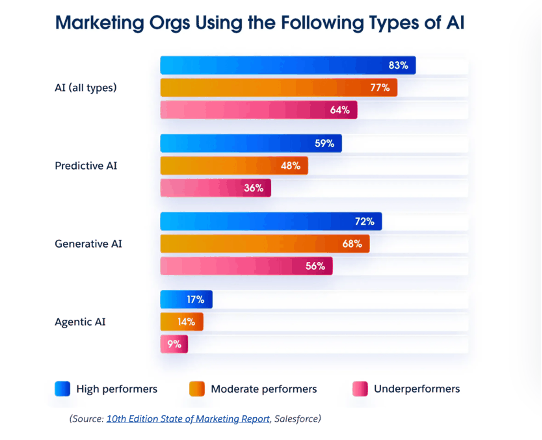
Salesforce State of Marketing (10th edition) chart showing the share of marketing organizations using each type of AI: generative AI at 56–72% but agentic AI at only 9-17%, by high, moderate and underperformers.
Key Salesforce Technology Takeaways from Dreamforce
Takeaway 1: What is Salesforce AIforce, and what does “Headless” Salesforce mean?
AIforce is Salesforce’s new framework that lets your team use Salesforce data and workflows from inside Claude, Slack and other tools, and “headless” means Salesforce is separating your data from its screens, so you no longer have to log into Salesforce to work with your CRM.
The headline of the show was “AIforce.” Salesforce summed it up this way: “With AIforce, people don’t have to go to login to Salesforce to get work done. Salesforce comes to them in Claude, Slack, Lightning, or wherever they want to work” (Salesforce).
Right now four things make that work:
Claudeforce (Salesforce in Claude) connects Anthropic’s Claude to your Salesforce org so a rep can ask questions and take action. It has 37 prebuilt sales skills and is available to all customers in beta.
Slackforce turns a prompt in Slack into a live, interactive view of your Salesforce data that your team can filter and explore.
Agentforce Coworker is an AI assistant built into the Salesforce Lightning screens your team already uses.
How to think about “Headless” for your team?
Think of Salesforce as two layers. One is the database where your accounts, contacts, opportunities, and campaign history live. The other is the screen/tool/user interface (UI) you click through to see and update your Salesforce data. Going headless means Salesforce is separating the two. Your data stays in Salesforce, but the “head,” the place where you see and work with the data on your screen can be Claude, Slack, or a custom app. Salesforce is betting that its long-term value is being the trusted system of record underneath whichever AI tools your company chooses.
Gabriel Sales believes this is probably true. It’s the best of both worlds now. Your team can access secure and protected data with the AI chat interfaces your teams want to use. Below are two quick video examples.
Claudeforce Demo: Using Salesforce Data Inside Claude
(Watch Time 90 Sec) Watch how we connect Claude to our own Salesforce org and ask questions about our CRM data in plain English, with no Salesforce screens required. A quick look at what “headless” Salesforce means for sales and marketing teams.
Agentforce Coworker Demo: Salesforce’s AI Assistant at Work
(Watch Time 2 Min) See Agentforce Coworker answer a real question about our pipeline and test data inside Salesforce, and what that one request cost in credits. A practical first look for Sales Cloud and Account Engagement teams.
Specific New Considerations
For Marketing Leaders & Sales Leaders
For Salesforce Admins & Account Engagement End Users
Takeaway 2: What is Salesforce Koa, and which AI models does Salesforce work with?
Koa is Salesforce’s first AI model built specifically for CRM work, and rather than betting on a single model, Salesforce works with several, including Anthropic’s Claude, Google’s Gemini and NVIDIA’s Nemotron, which Koa is built on.
Salesforce announced Koa, its first AI model built just for CRM work, like updating records and moving deals forward. It’s built on NVIDIA’s Nemotron. It was trained on models and not real customer data, and Salesforce says Koa makes three times fewer mistakes on those tasks than other leading AI models. It’s still in early testing with select customers.
Salesforce also expanded its partnerships with Google Cloud, bringing Gemini Enterprise into the mix (Salesforce). Between this, and its Anthropic partnership, Salesforce wants to be the trusted data and secured layer that works with many models. It will partner with AI companies to build its own models.
Specific New Considerations
For Marketing Leaders & Sales Leaders
For Salesforce Admins & Account Engagement End Users
Takeaway 3: What are Salesforce’s AIForce Hunter and Piper agents?
Hunter and Piper are two of Salesforce’s seven new “job-ready” Agentforce agents: Piper engages and qualifies inbound leads from your website and inbox, and Hunter researches prospects and runs outbound outreach.
Salesforce introduced seven prebuilt agents that companies can tailor to how they work, down to giving each one its own name (Salesforce). “Hunter” and “Piper” apply directly to anyone running Account Engagement and Sales Cloud.
Piper is an inbound pipeline agent that engages, qualifies, and converts leads that come in through your website and inbox. It’s generally available now. It takes customers 45 to 60 days to deploy it (on average). Your current scoring maturity and processes will impact success.
Hunter works outbound pipeline, from research through outreach. It’s in pilot, with general availability planned for November 2026.
Long term costs are not clear.
The other five (Casey, Fin, Paige, Carter, and Marshall) cover customer service, internal IT and HR requests, commerce, and supply chain. No Marketing Cloud–specific agent was announced on stage, and no pricing was shared for any of them.
Specific New Considerations
For Marketing Leaders & Sales Leaders
For Salesforce Admins & Account Engagement End Users
Takeaway 4: Is Account Engagement (Pardot) going away? Do I need to Move to Marketing Cloud Next?
No. Salesforce still fully supports Account Engagement, and every Account Engagement customer gets Marketing Cloud features through Account Engagement + with no migration required. So you don’t need to move to test some of the new features.
If you run marketing with Account Engagement on Salesforce, there were not a lot of new updates. The limited marketing news showed up in the teaser/preview for the Winter ’27 release. This included a Marketing Goals Agent, now in pilot, that turns a goal, a budget, and an audience into a recommended plan (Salesforce Winter 2027 Release Notes). There are new features planned if you are moving from “Marketing Cloud Engagement” aka ExactTarget to “Next”.
There is one quiet change that matters more for most of our Mid-Market and SMB marketing peers. Salesforce reinforced that every Account Engagement customer automatically gets access to Marketing Cloud Next features.
- Today if you have “Pardot Growth”, you can get Marketing Cloud Next Growth
- if you have Advanced Edition, you get Marketing Cloud Next Advanced.
To use Marketing Cloud Next you are required to activate Data 360 (was called Data Cloud). To do this effectively you need clean and complete data. Data360 is included in your current Account Engagement license with a finite amount of data credits. Salesforce is making it easy to test.
And here’s what we heard at the tables. A couple of people were in the middle of setting up Data 360. No one we talked to had moved completely to Marketing Cloud Next yet, they were testing. And those that have moved have been frustrated by Salesforce’s support. Gabriel Sales implemented three instances ourselves. But it’s early, and for most Account Engagement teams, waiting until after the Winter Release announcement is probably the right move.
Specific New Considerations
For Marketing Leaders
For Salesforce Admins & Account Engagement End Users
Clean up everything you’d have to migrate anyway: unused custom fields, stale lists, old automation rules, duplicate prospects, and sync errors between Account Engagement and Sales Cloud. That work pays off in Account Engagement today and makes any future move to Marketing Cloud Next faster.
Takeaway 5: How much does Agentforce cost? How Flex Credits and multipliers work?
Salesforce hasn’t announced pricing for AIforce, Claudeforce or the new agents; Agentforce itself runs on Flex Credits at a list price of $500 per 100,000 credits, or about $0.10 per standard action, but the number of credits each task uses (the multiplier) varies by task and can change.
Salesforce has not put a price on AIforce, Claudeforce and the new job-ready agents. It’s simply available to all customers in beta (Salesforce). Pricing came up at almost every table we sat at, and it was the hardest question for anyone to answer. If you can’t predict the cost, you can’t calculate ROI against what you’re spending today, and you can’t build a budget your CFO will sign.
Here’s why it’s so hard to pin down. Agentforce is priced on consumption through Flex credits and Einstein credits, a prepaid pool of credits that you spend as agents work. The list price is $500 per 100,000 credits, and a standard Agentforce action uses 20 credits, or about $0.10 per action (Salesforce Agentforce pricing). That sounds simple. The catch is the multiplier: how many credits each type of activity uses. In our pilots, we have seen both Units and Einstein Requests consumption. All have different names with various multipliers. Here at Gabriel Sales we are tracking various types of inquiries with our AI tools (both Claudeforce and Coworker) and recording the consumption to help us understand what the “token” cost is. Good news, after several months of experimenting, we are under 5% of our allotted “test credits” with Foundations.
How to Track Salesforce AI Costs in Digital Wallet
(Watch Time 2 Min) A quick walkthrough of Salesforce Digital Wallet, where to see the credits your AI tests consume, and how we log each test to forecast Agentforce and Einstein costs before they surprise you.
Here’s one example. (It’s wild and everything depends on the tool you use. And there are multiple tools you can use to get the same job done.) Salesforce’s own Flex Credits Rate Card sets the multiplier for every type of usage. A standard agent action is 20 credits. The same action through Slackbot is 40. Unifying customer records in Data 360 is 75,000 credits per million rows processed, which works out to roughly $375 per million rows at list price. The rate card also states: “Usage types, tiers, and associated multipliers may be updated from time to time.” And unused credits don’t roll over. They have to be used before your order ends. In other words, the price per action can change without the price per credit changing. We’ve already seen three versions of the rate card this year (February, mid-August, and August 31).
Another challenge and risk we heard at a couple of the tables is some of the flex credits and multipliers are not appearing in the Digital Wallet real time. There were a couple of teams that experienced a 24-hour lag. In one case a complex developer workflow and overhaul consumed almost an entire monthly budget, and they did not discover this for about 48 hours, resulting in a substantial bill as they continued to work on other projects. Salesforce did refund.
Claude is another outlier. We are currently testing both Claudeforce (through the connected MCP) and Agentforce Co-Worker. Sometimes for the same task. It appears at least right now Claude is more cost effective and has no effect on any Salesforce credits. We are not optimistic that this will continue.
And the tasks we are running (see below) pale in comparison to the complexity of what Salesforce is promising in the Winter Release 27 for Marketers. We have just started this monitoring so there is not much there yet. We will share what we learn. Stay tuned.
Below is a quick intro video to your Digital Wallet and an example of how we are logging our activity to track for future budgeting.
How to Track Salesforce AI Costs in Digital Wallet
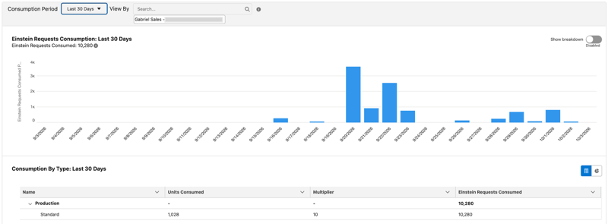
Screenshot of Gabriel Sales’ Salesforce Digital Wallet showing Einstein Requests consumed over 30 days of AI testing: 10,280 requests from 1,028 units at a 10x multiplier.
Digital Wallet Dashboard Example
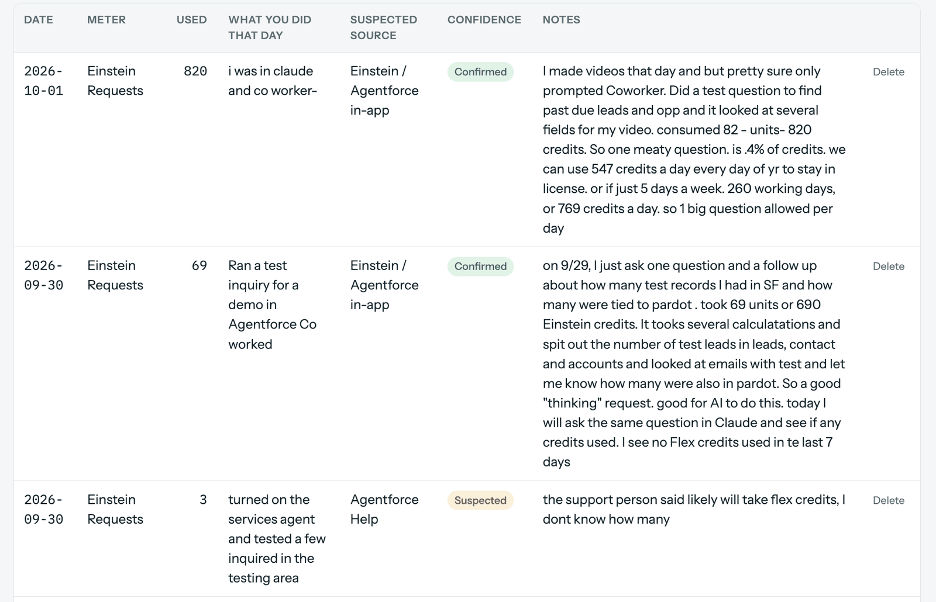
Gabriel Sales’ AI usage log recording each Claudeforce and Agentforce Coworker test, the credits it used and the suspected source, to forecast Salesforce AI costs.
Specific New Considerations
For Marketing Leaders & Sales Leaders
Treat AI pricing as usage-based utility. Your bill depends on how much you use and on rates the vendor can adjust, so get the terms in writing before you commit and/or agree to an upgrade.
The reality we all face is that until Anthropic and/or OpenAI go public costs won’t be clear. So Salesforce costs with their new “Headless” framework will eventually be like forecasting energy. Fundamentally energy costs and token costs are the same thing. If you are up for a renewal, ask your Salesforce sales rep four questions:
- What is our current rate card, and how much notice do we get before a multiplier changes?
- What happens to unused credits?
- Is there a cap or price lock for the term?
- If we sign an Agentic Enterprise License Agreement (AELA), what does renewal look like?
Start with a small, well-defined pilot so you learn your real consumption before you sign anything large. Set your ROI baseline before the pilot starts, so you can prove what the spend returned.
For Mid Market and Small Businesses the right use cases are going to make all the difference. For example if your scoring and hand off is already solid Piper may not make sense from a usage standpoint . But using Claudeforce for pre-call prep is low cost with high impact output.
Finally calculating ROI once the costs are clear will be easy to justify against sales productivity, conversations “Opportunity” lift and cost reductions. As discussed at the top of this article you need to benchmark now so you can measure against it later. Gabriel Sales is learning to monitor consumption by tasks so we can help you calculate the front end consumption costs. This will be a big focus for Gabriel Sales throughout 2027.
For Salesforce Admins & Account Engagement End Users
Takeaway 6: Are Most Mid-Market Enterprises and Small Businesses using Agentic AI yet?
Not yet. At two dozen Dreamforce roundtables with 100+ peers, almost no mid-market team was running agents in sales or marketing, and the research agrees: 94% of mid-market companies use generative AI (Kaufman Rossin, 2026), but only 22% of organizations under $1 billion in revenue are scaling AI agents (McKinsey, 2026).
We spent most of our time at Dreamforce in two dozen community and customer roundtables, talking with 100+ peers, on agentic AI and data, and they were the best use of our time at the show. If you go next year, prioritize them.
The top takeaway from those sessions: the Enterprise is running/experimenting with agentic AI, and most mid-market companies are not there yet. Most of the people we talked to were using generative AI for drafting emails, content creation, summarizing calls, and doing research. No one we talked to (outside of the Fortune 500 and a few AI start-ups) was using agents that take action on their own for Sales, with the exception of third party tools like Apollo and Clay for GTM. However, some had made real progress using AI in customer service and support. In casual conversations with 100+ professionals, we heard four trending themes:
- Admins don’t have the support or the time to get to AI with everything else on their plate.
- Their data isn’t ready.
- Almost everyone who felt they were making progress and getting closer to being able to use agentic AI had one thing in common: their CMO and their CRO or CSO were jointly committed to getting the data cleaned up.
- A handful were pulling together a data governance council, so a business leader was accountable for working with the admin team on data cleanup and process. (More on that in Takeaway 7.)
We did some fact checking when we got back and the research lines up with what we heard.
- AI use grew among firms with 20 or more employees but didn’t change significantly among firms with fewer than 20 (US.Census Bureau).
- McKinsey’s 2026 State of AI found that 40% of respondents from organizations with more than $1 billion in revenue report scaling AI agents, up from 27% a year earlier, while the share at smaller organizations stayed flat at 22% (McKinsey).
- Marketing is further behind than sales and service. Salesforce’s State of Marketing found that only 13% of marketers are currently using Agentic AI across all platforms (Salesforce) While 66% of customer service organizations now use it, up from 39% the year before (Salesforce).
- Sales sits somewhere in between: 54% of sellers say they’ve used agents (Salesforce). “Used” isn’t the same as deployed at scale, but it tells you some of your sales reps are probably already experimenting.
We also sat in on a handful of Enterprise presentations. Some Enterprise companies were using agentic AI at the very top of the funnel, but most were applying it deeper in the business: insights, supply chain, and customer service, where the data is far richer.
For the Enterprise, the tone shifted from Hype to the Need for ROI proof
The Agentforce keynotes talked more about proof than anything else. We are assuming that’s because more than 30,000 customers are now live on Agentforce (not clear on how that is calculated and what it is used for, our guess is customer service). Salesforce did introduce an Agentic ROI Playbook and a first look at Agent Optimizer, which finds problems in live agents, suggests fixes, and tests changes before they go out (Cloudgaia keynote recap).
Salesforce repeatedly said humans must stay in the loop. Its Agentic Enterprise Index reported that across its customer base, organizations increased activated agents by nearly 3x in the past year. Once again almost none of this is occurring in Sales and Marketing silos yet. And most of these Agents are being deployed in the enterprise.
Our hope is that by the time mid-market and small businesses need to fully commit, there’s real clarity on costs and the agents have been honed.
Specific New Considerations
For Marketing & Sales Leaders
For Salesforce Admins & Account Engagement End Users
Takeaway 7: Why is data readiness the biggest barrier to Salesforce AI?
Because AI is only as good as the data it reads: duplicate, incomplete and disconnected records produce confident wrong answers, and Salesforce said repeatedly at Dreamforce 2026 that a company’s own clean data is its most durable advantage.
Your Data is critically important. Most marketers and sales professionals want to avoid or have never dealt with the technical aspects of data management and data hygiene. You can no longer sit on the sideline and you need to become involved (or at least fluent) in this less than sexy and fun aspect of sales and marketing. It will become core to your sales and marketing success as you deploy Agentic AI.
To help the Enterprise understand and manage its data architecture Salesforce introduced the Trusted Enterprise AI Harness, (SMBs and Mid-Market get “Foundations”, more about that below). It’s worth understanding this because some form of it will eventually get to smaller companies. The AI Harness packages six data capabilities around (context, agency, action, governance, security, and models). It ties all of your data into one view of the customer that can be used by your Agents. Those include:
Data 360 (formerly Data Cloud, which connects and organizes all your customer data into a single reliable source),
Informatica (data quality and integration)
MuleSoft (connecting systems)
Tableau (analytics),
AI Control Plane that shows every agent running across the company
Salesforce stated over and over again that the “models will continue to change,” so a company’s owned and proprietary customer data and the context it can create for your team and agents will be your most durable and lasting competitive advantage.
Sales and marketing leaders and their teams must take ownership of their Sales Cloud and Account Engagement Data immediately.
From Roundtable on Preparing for AI Success
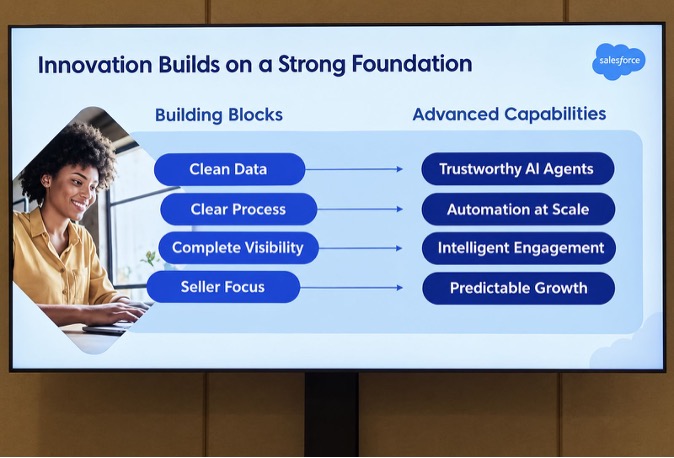
Dreamforce 2026 Sales Cloud roundtable slide: clean data, clear process, complete visibility and seller focus are the building blocks for trustworthy AI agents, automation at scale and predictable growth.
What this means if you’re not an Enterprise
The AI Harness is built for large Enterprises running many agents across many systems. You don’t need it to get started, and nothing in it is aimed at smaller companies yet.
Salesforce does offer smaller teams a way in. You can start with Salesforce Foundations. It is a no-cost add-on that gives you access to Data 360 and Agentforce, with a starting grant of credits that get used up as you use those features (Salesforce). You may need Enterprise Edition to access it. As mentioned earlier, we have been testing programs for several months and still at less than 5% of our Foundations allotment.
The core message and direction Salesforce is going applies at any size: AI works only as well as the data underneath it. In Salesforce’s own small and mid-sized business research they are acknowledging data is the largest challenge for most companies and they are trying to help them understand and address this issue.
- 84% of SMB leaders say complete, accurate data is increasingly critical to their success (Salesforce).
- For SMB marketers, messy data (siloed, low quality, or too much to process) is the number one blocker to getting real value out of AI, and only 27% are completely satisfied with their ability to unify customer data (Salesforce).
In our Gabriel Sales Automation & Sales Enablement Maturity Matrix™, this is the Data Enablement pillar, and it’s the one that decides whether everything else works. And Gabriel Sales has found the same things to be true across our Account Engagement, Sales Cloud and Data Readiness Health Checks in some areas that are frequently overlooked.
- 90% of the orgs we review have sync errors and/or missed tracking (Gabriel Sales AI Data Health Check data)
- 30% struggle to capture critical fields after leads are passed to sales. (Gabriel Sales AI Data Health Check data)
- 30% have broken connections that damage scoring, attribution and AI. (Gabriel Sales AI Data Health Check data)
- 90% have broken data governance. (Gabriel Sales AI Data Health Check data)
Even Salesforce used a Third Party solution to help clean its data before bringing it into Data 360
We sat in on another data roundtable where Salesforce’s own chief admin and chief data architect walked through the two Data 360 instances Salesforce runs internally. The most interesting thing they shared, very candidly, was that they used Snowflake to clean up their data before they moved it into Data 360. They found Snowflake made it easier to clean the data first and then move it. Once it was ready here are the data lakes they created (see image below).
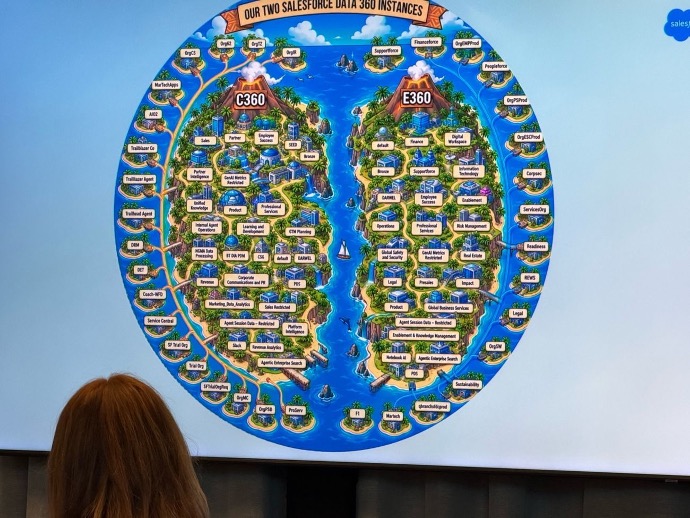
Salesforce’s two internal Data 360 instances, one for customer data and one for employee data, shown at a Dreamforce 2026 data roundtable.
A practical framework for getting your team aligned on data
We also attended a roundtable on how to get a team aligned on data, presented by Mehmet Orun. He walked through two frameworks worth borrowing. The first is a data quality management cycle: profile your data to find patterns and problems, clean and standardize it, enrich it from trusted sources, unify customer records across systems, and monitor it so it stays fit for purpose as your business changes.
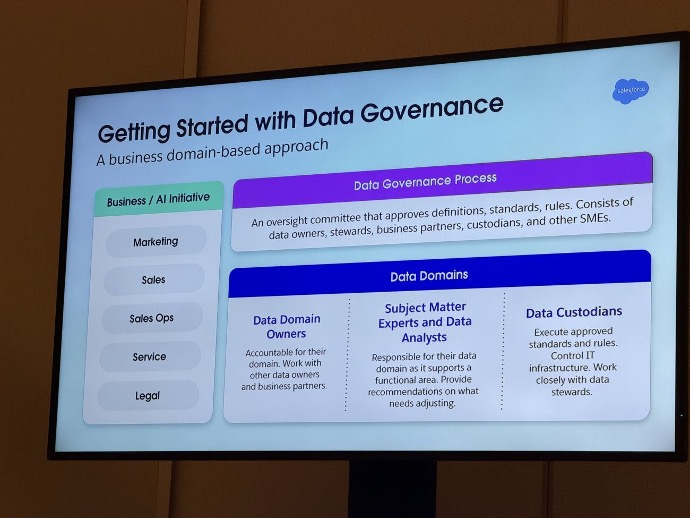
Getting started with data governance: a business-domain model with an oversight committee, data domain owners, subject matter experts and data custodians.
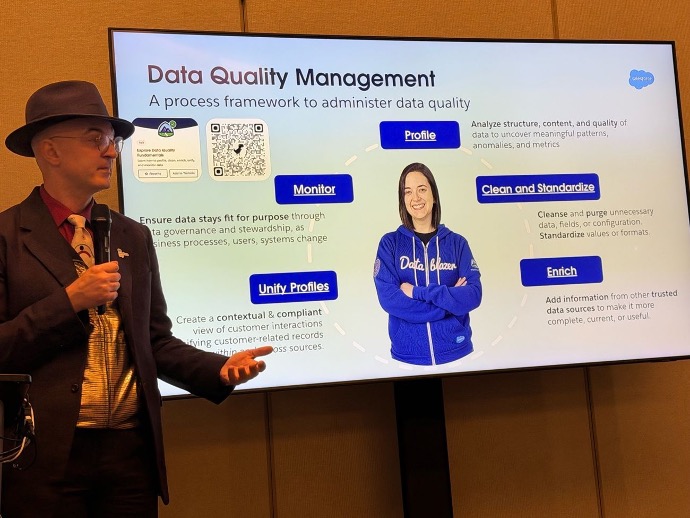
Mehmet Orun presents Salesforce data quality management cycle: profile, clean and standardize, enrich, unify profiles and monitor, presented at a Dreamforce 2026 roundtable.
Specific New Considerations
For Marketing Leaders & Sales Leaders
For Salesforce Admins & Account Engagement End Users
Start with the first step of the cycle: profile. Build a baseline of duplicates, gap rates on fields your scoring and routing depend on, stale records, and sync errors between Account Engagement and Sales Cloud. Then bring the governance framework to your leadership and position yourself as the data custodian, not the owner of every domain. And take the Salesforce lesson to heart: fix your data at the source before you migrate or fully trust other Agentic tools.
How Gabriel Sales Can Help You On This Data and AI Readiness Journey
Gabriel Sales can help both Small and Mid-Market companies clean, manage and migrate their data, and activate AI in series of steps. If you are a new client we can start with a Free Salesforce AI Data Readiness Health Check which also includes a quick de-duplication review/analysis. This is run by Gabriel Sales Co-Founder Carol Springer (a certified Salesforce and Account Engagement expert). That can be followed by a Data Readiness Audit also run by Carol Springer, and Dean Westervelt, a 25-year data scientist veteran. We then offer data readiness repair and AI activation and data governance as a managed service. Finally, when you are ready we can help you launch your Agents or migrate to Marketing Cloud Next.
Takeaway 8: What are Salesforce products called now?
Sales Cloud is Sales Cloud again, Agentforce Marketing is Marketing Cloud again, and Account Engagement’s official name is still Marketing Cloud Account Engagement (formerly Pardot).
Days before the event, Salesforce reversed part of last year’s Agentforce rebrand. As The Next Web put it, Sales Cloud “became Agentforce Sales last autumn, and is Sales Cloud again” (The Next Web). Marketing followed. Salesforce’s own site now says, “Agentforce Marketing was a name used to describe all of Marketing Cloud’s editions. It is no longer in use, and you will instead see Marketing Cloud” (Salesforce). Account Engagement’s official name is still Marketing Cloud Account Engagement, and Salesforce calls Pardot “the legacy product name” (Salesforce).
Agentforce itself isn’t going anywhere. Salesforce reported Agentforce annual recurring revenue of more than $1.5 billion, up over 240% year over year (Salesforce). Only the labels are moving.
However, the labels matter because they are how you are contracted. You will want clarity on what you already have. We check this a part of our Free Health Checks. All these changes to names and features can impact what you pay when you turn things on.
Specific New Considerations
For Marketing Leaders & Sales Leaders
For Salesforce Admins & Account Engagement End Users
FAQs
What were the biggest Salesforce announcements at Dreamforce 2026?
The headline was AIforce, which lets teams use Salesforce data inside Claude, Slack and other tools through Claudeforce, Slackforce and Agentforce Coworker. Salesforce also announced seven job-ready Agentforce agents, including Piper for inbound leads and Hunter for outbound, the Koa CRM reasoning model, and the Trusted Enterprise AI Harness.
Is Salesforce Account Engagement (Pardot) going away?
No. Salesforce continues to fully support Account Engagement, and every Account Engagement customer gets access to Marketing Cloud features through Account Engagement + with no migration required. Move to Marketing Cloud Next when your business case and data readiness support it, not because of a keynote.
What is Claudeforce?
Claudeforce, also called Salesforce in Claude, connects Anthropic’s Claude to your Salesforce org so users can ask questions and take action on CRM data in plain English. It includes 37 prebuilt sales skills and is available to all Salesforce customers in beta.
What does headless Salesforce mean?
Headless means Salesforce is separating its data layer from its screens. Your accounts, contacts and opportunities stay in Salesforce, but people can work with that data from Claude, Slack or custom apps instead of logging into the Salesforce interface.
How much does Agentforce cost?
Currently (Oct 2026) Agentforce uses Flex Credits at a list price of $500 per 100,000 credits, and a standard action uses 20 credits, or about $0.10. Salesforce’s rate card sets different multipliers by usage type and says they may be updated from time to time. Pricing for AIforce, Claudeforce and the job-ready agents has not been announced.
Are mid-market companies using agentic AI?
Mostly not yet. 94% of mid-market companies use generative AI (Kaufman Rossin, 2026), but McKinsey found only 22% of organizations under $1 billion in revenue are scaling AI agents, compared with 40% of larger organizations. Customer service is the leading agentic use case.
What should mid-market Salesforce teams do after Dreamforce 2026?
Inventory your licenses and credits, clean up Sales Cloud and Account Engagement data, document lead hand-offs, and record an ROI baseline. Then pilot one low-cost use case, such as AI meeting prep in Claudeforce or Agentforce Coworker, and track the credits it uses.
Where To Go From Here
If you take one thing from this Dreamforce ’26 article, make it this: With all the traction being created by Salesforce and their Enterprise customers, AI is going mature faster than most Mid Market and SMB currently have visibility into. You don’t need to deploy Agents now. Waiting until they are more fully baked will make them easier and more cost effective to deploy at scale. It will also be easier to intelligently budget for their deployment. You do need to start thinking about where your team can capture the most value.
That means don’t wait on your data readiness and early pilots. Start with the right type of system improvements in your existing tools now. Keep improving the automation you already have in Account Engagement. Spend the 3 to 12 months cleaning up and connecting your data, and get your leadership team behind this effort, with a leader or leaders willing to be accountable for data. Then pick one or two specific use cases and test them in Claudeforce and/or Agentforce Coworker, where you can measure the before and after. Build the data, the team and the ROI process.
If you want a second set of eyes on where your data and automation stand today, start with our free Technology Health Check. It’s a no-cost look at your Salesforce and Account Engagement setup that shows you where you are and what to fix first. You can also see how we’ve helped teams like yours in our case studies.
And finally keep an eye out for additional content. We will continue to keep you apprised of what we learn as we implement these tools for ourselves and our forward leaning clients.
If you have any questions, just want to explore something or would like to learn more about our free Health Checks and Maturity Benchmarks complete the form below and we can schedule a call.
About the Author
Carol Springer is a Co-Founder. She has been working at the inflection point of Marketing an Sales Operations implementing an optimizing Salesforce and Marketing Automation for the past 15 years. Carol has multiple Salesforce certifications leads the Denver, Colorado Salesforce Marketers User Group and is a frequent Salesforce Speaker. Prior to focusing on Sales and Marketing Ops Carol was an award winning enterprise sales executiv
Sources & further reading
-
- Salesforce: AIforce Announcement
- Salesforce: AI
- Salesforce: Claudeforce
- Salesforce: Slack Surfaces Transform Enterprise Data
- Salesforce: Agentforce Coworker
- Salesforce: Trusted Enterprise AI Harness
- Salesforce and Google Cloud Unify Infrastructure and Agents
- Salesforce: Job-Ready AI Agents
- SalesTechStar: Apollo Named Flagship Data Partner for Hunter
- Salesforce: Winter ’27 Product Release Announcement
- Cloudgaia: Dreamforce 2026 Agentforce Keynote Recap
- The Next Web: Salesforce Drops Agentforce Branding from Product Names
- Salesforce: Agentforce Marketing Explained
- Salesforce: B2B Marketing Automation
- Salesforce: Agentforce Pricing
- Salesforce: Flex Credits Rate Card (August 31, 2026)
- Salesforce Help: About Digital Wallet
- Salesforce Help: Digital Wallet Usage Reports
- Salesforce: Foundations
- Salesforce: FY27 Q2 Earnings
- Salesforce: State of Sales Report 2026
- Salesforce: SMB Takeaways from the State of Marketing
- Salesforce: Small Business Trends
- Salesforce: AI Service Agents Improve Customer Satisfaction
- Kaufman Rossin: 94% of Mid-Market Companies Use Generative AI (May 2026)
- McKinsey: The State of AI
- U.S. Census Bureau: AI Use by Businesses (May 2026)
- UpGuard: 68% of Security Leaders Admit to Unauthorized AI Usage
- Trailhead: Explore Data Quality Fundamentals
- Gabriel Sales: Free Salesforce AI Data Readiness Health Check